Chapter 9: Ink: Introducing Story API
Objectives
- Apply the Continue() and ContinueMaximally() methods to load story content
- Utilize the canContinue property to detect story continuation
- Implement choice loading using currentChoices
- Execute player choices with ChooseChoiceIndex()
- Access tags from Ink stories using currentTags
- Analyze the canContinue-ContinueMaximally-currentChoices pattern
Table of Contents
Loading Story Chunks
There are two methods for loading the next part of the story: Continue() and ContinueMaximally(). Using this methods are also affected by End of Story and the canContinue property of the Story API.
Continue()
The method Continue() will load the next story chunk from the current point until the next newline character in the story. In other words, it will load a “paragraph” until there is a line between what it loaded and the next part of the story.
New Ink.ink:
First chunk.

Second chunk.

Third chunk.
NewBehaviourScript.cs:
using System.Collections;
using System.Collections.Generic;
using UnityEngine;
// Add the Ink Runtime
using Ink.Runtime;

public class NewBehaviourScript : MonoBehaviour
{
    // Add a TextAsset representing the compiled Ink Asset
    [SerializeField] private TextAsset inkJSONAsset;

    // Start is called before the first frame update
    void Start()
    {
        // Create a new Story object using the compiled (JSON) Ink story text
        /* Lines 642-670 omitted */
        }
    }
}
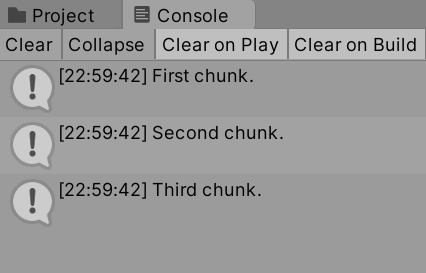
In the above code example, the repeated uses of the Continue() method will load the story. The Console window will show “First chunk.”, “Second chunk.”, and then “Third chunk.”.
Note: As of 2025, it’s considered best practice to use
[SerializeField] privatefields instead of public fields for Unity Editor exposure. This encapsulates the data while still allowing Inspector access.
ContinueMaximally()
The ContinueMaximally() method will load all text content until it encounters a set of choices or the end of the story.
New Ink.ink:
First chunk.

Second chunk.

Third chunk.
NewBehaviourScript.cs:
using System.Collections;
using System.Collections.Generic;
using UnityEngine;
// Add the Ink Runtime
using Ink.Runtime;

public class NewBehaviourScript : MonoBehaviour
{
    // Add a TextAsset representing the compiled Ink Asset
    [SerializeField] private TextAsset inkJSONAsset;

    // Start is called before the first frame update
    void Start()
    {
        // Create a new Story object using the compiled (JSON) Ink story text
        Story exampleStory = new Story(inkJSONAsset.text);

        Debug.Log(exampleStory.ContinueMaximally());

        Debug.Log(exampleStory.ContinueMaximally());

    }

    // Update is called once per frame
    void Update()
    {

    }
}
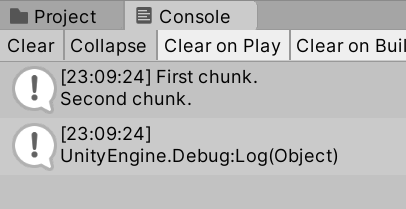
In the above code, the text “First chunk. / Second chunk.” will be loaded first. With the second call to ContinueMaximally(), the End of the Story will be encountered.
End of Story
Attempting to load story content after a story has ended will result in an error.
New Ink.ink:
First chunk.
NewBehaviourScript.cs:
using System.Collections;
using System.Collections.Generic;
using UnityEngine;
// Add the Ink Runtime
using Ink.Runtime;

public class NewBehaviourScript : MonoBehaviour
{
    // Add a TextAsset representing the compiled Ink Asset
    [SerializeField] private TextAsset inkJSONAsset;

    // Start is called before the first frame update
    void Start()
    {
        // Create a new Story object using the compiled (JSON) Ink story text
        Story exampleStory = new Story(inkJSONAsset.text);

        Debug.Log(exampleStory.Continue());

        Debug.Log(exampleStory.Continue());
    }

    // Update is called once per frame
    void Update()
    {
    }
}

To help with this, the Story API provides a property named canContinue.
canContinue
Attempting to load more story when it does not exists will produce an error. However, as this is a common problem, the Story API provides a Boolean property called canContinue that will always be true if there is more story to load.
Used as part of a looping structure, the Boolean value can be tested. As long as it is true, the next part of the story will be loaded.
New Ink.ink:
First chunk.

Second chunk.

Third chunk.

Fourth chunk.
NewBehaviourScript.cs:
using System.Collections;
using System.Collections.Generic;
using UnityEngine;
// Add the Ink Runtime
using Ink.Runtime;

public class NewBehaviourScript : MonoBehaviour
{
    // Add a TextAsset representing the compiled Ink Asset
    [SerializeField] private TextAsset inkJSONAsset;

    // Start is called before the first frame update
    void Start()
    {
        // Create a new Story object using the compiled (JSON) Ink story text
        Story exampleStory = new Story(inkJSONAsset.text);

        // Each loop, check if there is more story to load
        while(exampleStory.canContinue)
        {
            // As long as there is story, show the text in the Console window
            Debug.Log(exampleStory.Continue());
        }
    }
}
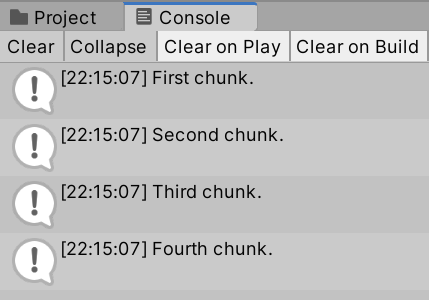
Moving into more advanced uses of the Story API, the property canContinue, and looping structures using it, are foundational to creating a game loop where more story is dynamically loaded as players make choices in the story.
Loading Choices
So far in this chapter, text has been loaded using the methods of Continue() and ContinueMaximally(). These can be helpful when working with simple stories. However, most Ink project use choices. To load those, additional properties and object types are needed.
currentChoices
The property currentChoices of the Story API will always contain any current choices. If any choices exist within the current chunk of the loaded story, they will exist within a List<Choice> structure as provided by the Story API property.
New Ink.ink:
The princess sighed. "Could this day get any worse?" She was lost, scared, and wanted nothing more than to get back to her home in the castle.

She suddenly heard a noise in the woods before her. She stopped and tried to listen for its source.

* She stayed where she was.
* She attempted to communicate. "Hello? Are you with the king's knights?"
-
NewBehaviourScript.cs:
using System.Collections;
using System.Collections.Generic;
using UnityEngine;
// Add the Ink Runtime
using Ink.Runtime;

public class NewBehaviourScript : MonoBehaviour
{
    // Add a TextAsset representing the compiled Ink Asset
    public TextAsset InkJSONAsset;

    // Start is called before the first frame update
    void Start()
    {
        // Create a new Story object using the compiled (JSON) Ink story text
        Story exampleStory = new Story(InkJSONAsset.text);

        // Each loop, check if there is more story to load
        while(exampleStory.canContinue)
        {
            // As long as there is story, show the text in the Console window
            Debug.Log(exampleStory.ContinueMaximally());

            Debug.Log(exampleStory.currentChoices);
        }
    }
}

Choice Objects
The currentChoices property is a List<Choice>. This means that each object in the List is of the type Choice.
Each Choice object is composed of multiple properties, but two important ones are its text and index. When loaded by the Ink Runtime, this means that every choice has access to the text shown to the player as well as its position (index) in the current collection of choices.
New Ink.ink:
The princess sighed. "Could this day get any worse?" She was lost, scared, and wanted nothing more than to get back to her home in the castle.

She suddenly heard a noise in the woods before her. She stopped and tried to listen for its source.

* She stayed where she was.
* She attempted to communicate. "Hello? Are you with the king's knights?"
-
NewBehaviourScript.cs:
using System.Collections;
using System.Collections.Generic;
using UnityEngine;
// Add the Ink Runtime
using Ink.Runtime;

public class NewBehaviourScript : MonoBehaviour
{
    // Add a TextAsset representing the compiled Ink Asset
    public TextAsset InkJSONAsset;

    // Start is called before the first frame update
    void Start()
    {
        // Create a new Story object using the compiled (JSON) Ink story text
        Story exampleStory = new Story(InkJSONAsset.text);

        // Each loop, check if there is more story to load
        while(exampleStory.canContinue)
        {
            // As long as there is story, show the text in the Console window
            Debug.Log(exampleStory.ContinueMaximally());

            // Show the first (0) choice's text
            Debug.Log(exampleStory.currentChoices[0].text);

            // Show the first (0) choice's index
            Debug.Log(exampleStory.currentChoices[0].index);
        }
    }
}

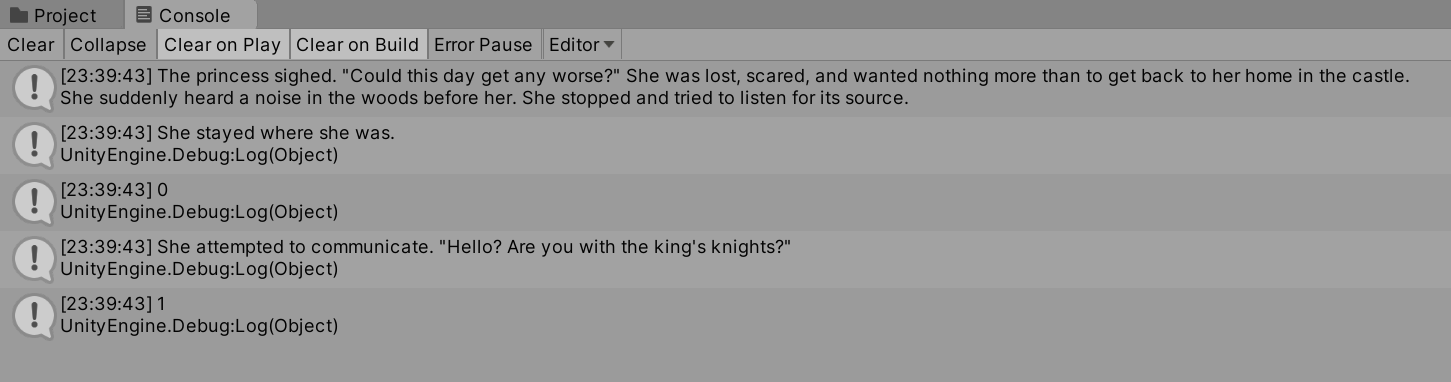
In the above example, the property canContinue is tested. If there is more story to load, the method ContinueMaximally() is run. Next, the text and index properties of first (0-position) choice in the currentChoices property are shown. These are She stayed where she was. and 0 as shown in the Console window.
The usages of canContinue, ContinueMaximally(), and then currentChoices is, in fact, very common and an important pattern for using the Ink Story API in Unity.
The canContinue-ContinueMaximally()-currentChoices Pattern
Previously, the methods ContinueMaximally() and Continue() were explained as “loading the next story chunk.” While they have been used as part of showing text chunks of stories with the Debug.Log() method, an important part of their definitions and usage fall on the word load as part of that explanation. They load the next part of the story. As a result, they return the text chunk, but their primary focus is actually the loading of the next story chunk.
In the previous examples in this chapter, the combination of canContinue and then ContinueMaximally() and Continue() were key to preventing the error of attempting to load more story after it had ended. They are and should always be used in connection with each other.
Generally, the property canContinue is used first and then followed by one of the method calls to load the next part of the story. Most of the time, the method ContinueMaximally() is a good option because it will “load all text content until it encounters a set of choices or the end of the story.” (There are important cases where Continue() is a better option, but they will be explained as part of working with tags later in this chapter.)
Because ContinueMaximally() handles the loading, the next in the pattern is using the currentChoices property, as it will be populated with the choices loaded by the previous loading cycle. In other words, the pattern starts with using canContinue, moves into loading with ContinueMaximally(), and then moves to working with any choices within the current story chunk with the property currentChoices.
In fact, as currentChoices is a List<Choice> this means that a second loop can be created inside of the existing use of while(canContinue) that uses the foreach() statement to iterate through the members of the List of Choice objects.
Using the previous code in this chapter as an extended example, the outer and inter-loop structure of the canContinue-ContinueMaximally()-currentChoices pattern would look like the following:
NewBehaviourScript.cs:
using System.Collections;
using System.Collections.Generic;
using UnityEngine;
// Add the Ink Runtime
using Ink.Runtime;

public class NewBehaviourScript : MonoBehaviour
{
    // Add a TextAsset representing the compiled Ink Asset
    public TextAsset InkJSONAsset;

    // Start is called before the first frame update
    void Start()
    {
        // Create a new Story object using the compiled (JSON) Ink story text
        Story exampleStory = new Story(InkJSONAsset.text);

        // Each loop, check if there is more story to load
        while(exampleStory.canContinue)
        {
            // Load the next story chunk and return the current text
            string currentTextChunk = exampleStory.ContinueMaximally();

            // Show the current story text in the Console window
            Debug.Log(currentTextChunk);

            // Iterate through the current choices
            // For each choice in currentChoice, set its values to the new variable 'choice'
            foreach (Choice choice in exampleStory.currentChoices)
            {
                // Show choice's text
                Debug.Log(choice.text);

                // Show choice's index
                Debug.Log(choice.index);
            }

        }
    }
}
Making Choices
Loading text content and showing choices are the first step toward making an interactive project. The next is using that data to “make choices” that affect the Ink story.
As was reviewed in the previous section, each Choice object has two (among other) key properties: text and index. Previously, the emphasis was on the text property. In order to make choices using Choice object, their index becomes the focus.
ChooseChoiceIndex()
The method ChooseChoiceIndex() accepts a valid index from the current set of choices. When given this index, it triggers internal code to shift to that branch of the story that moves to the next loading position. This method is how “choices” are made.
New Ink.ink:
The princess sighed. "Could this day get any worse?" She was lost, scared, and wanted nothing more than to get back to her home in the castle.

She suddenly heard a noise in the woods before her. She stopped and tried to listen for its source.

* She stayed where she was.
    The princess stopped moving and looked around again.

* She attempted to communicate. "Hello? Are you with the king's knights?"
    At her words, the forest went silent.
-
NewBehaviourScript.cs:
using System.Collections;
using System.Collections.Generic;
using UnityEngine;
// Add the Ink Runtime
using Ink.Runtime;

public class NewBehaviourScript : MonoBehaviour
{
    // Add a TextAsset representing the compiled Ink Asset
    public TextAsset InkJSONAsset;

    // Start is called before the first frame update
    void Start()
    {
        // Create a new Story object using the compiled (JSON) Ink story text
        Story exampleStory = new Story(InkJSONAsset.text);

        // Each loop, check if there is more story to load
        while(exampleStory.canContinue)
        {
            // Load the next story chunk and return the current text
            string currentTextChunk = exampleStory.ContinueMaximally();

            // Show the current story text in the Console window
            Debug.Log(currentTextChunk);

            // Iterate through the current choices
            // For each choice in currentChoice, set its values to the new variable 'choice'
            foreach (Choice choice in exampleStory.currentChoices)
            {
                // Show choice's text
                Debug.Log(choice.text);

                // Show choice's index
                Debug.Log(choice.index);
            }

            // Pick the first (0) choice based on its index in the currentChoices List<Choice>
            exampleStory.ChooseChoiceIndex(0);

        }
    }
}
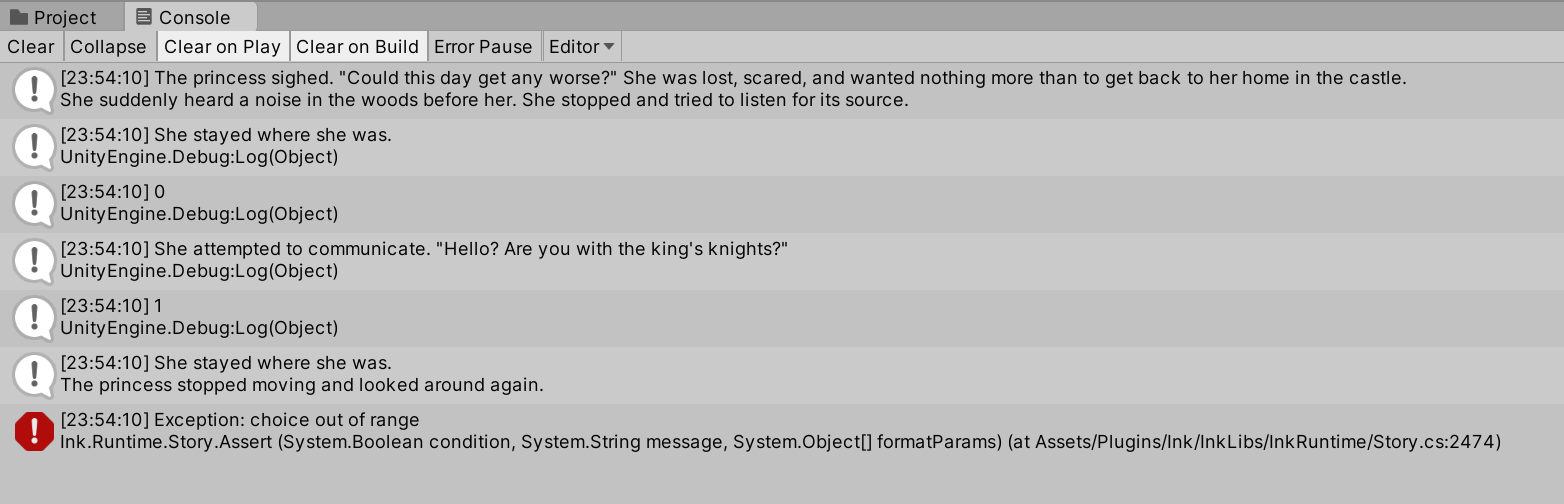
In the above code, the canContinue-ContinueMaximally()-currentChoices pattern is used. Following that, the method ChooseChoiceIndex() is used. For the first set of choices, this produces the out of the text of the Choice: She stayed where she was. This is then followed by the method ContinueMaximally(), loading the result of the choice The princess stopped moving and looked around again.
However, this produces an error on the second major loop. The exception “Choice Out of Range” is raised when the method ChooseChoiceIndex() is called a second time when there are no choices to “choose” from via the property currentChoices.
Choice Out of Range Error
The exception “choice out of range” is raised when the method ChooseChoiceIndex() attempts to “choose” a choice that is outside of the range of the current length of the currentChoices property.
To protect against this, there are a number of different solutions. One quick way would be to test the Count of the currentChoices property. If it is greater than 0, that would mean there is at least one Choice in the List<Choice> that could be “chosen.”
using System.Collections;
using System.Collections.Generic;
using UnityEngine;
// Add the Ink Runtime
using Ink.Runtime;

public class NewBehaviourScript : MonoBehaviour
{
    // Add a TextAsset representing the compiled Ink Asset
    public TextAsset InkJSONAsset;

    // Start is called before the first frame update
    void Start()
    {
        // Create a new Story object using the compiled (JSON) Ink story text
        Story exampleStory = new Story(InkJSONAsset.text);

        // Each loop, check if there is more story to load
        while(exampleStory.canContinue)
        {
            // Load the next story chunk and return the current text
            string currentTextChunk = exampleStory.ContinueMaximally();

            // Show the current story text in the Console window
            Debug.Log(currentTextChunk);

            // Iterate through the current choices
            // For each choice in currentChoice, set its values to the new variable 'choice'
            foreach (Choice choice in exampleStory.currentChoices)
            {
                // Show choice's text
                Debug.Log(choice.text);

                // Show choice's index
                Debug.Log(choice.index);
            }

            // Is the number of choices in the List<Choice> (its Count) greater than 0?
            if(exampleStory.currentChoices.Count > 0)
            {
                // Pick the first (0) choice based on its index in the currentChoices List<Choice>
                exampleStory.ChooseChoiceIndex(0);
            }
        }
    }
}
Loading Tags
In Ink, tags are processed on a per-line basis. Since they are associated with the line they follow, or the preceding line when used by themselves, they require understanding their placement, parsing them, and then proceeding with loading the story.
currentTags
The Story API property currentTags is a List<String> of all current tags collected during the last loading event (from calling the methods Continue() or ContinueMaximally()).
New Ink.ink:
"What do you think of this?" #Dan

"I'm not sure." #Liam
NewBehaviourScript.cs:
using System.Collections;
using System.Collections.Generic;
using UnityEngine;
// Add the Ink Runtime
using Ink.Runtime;

public class NewBehaviourScript : MonoBehaviour
{
    // Add a TextAsset representing the compiled Ink Asset
    public TextAsset InkJSONAsset;

    // Start is called before the first frame update
    void Start()
    {
        // Create a new Story object using the compiled (JSON) Ink story text
        Story exampleStory = new Story(InkJSONAsset.text);

        // Each loop, check if there is more story to load
        while(exampleStory.canContinue)
        {
            // Load the next story chunk and return the current text
            string currentTextChunk = exampleStory.ContinueMaximally();

            // Get any tags loaded in the current story chunk
            List<string> currentTags = exampleStory.currentTags;

            // For each tag in currentTag, set its values to the new variable 'tag'
            foreach (string tag in currentTags)
            {
                // Print current tag
                Debug.Log(tag);
            }

            // Show the current story text in the Console window
            Debug.Log(currentTextChunk);
        }
    }
}
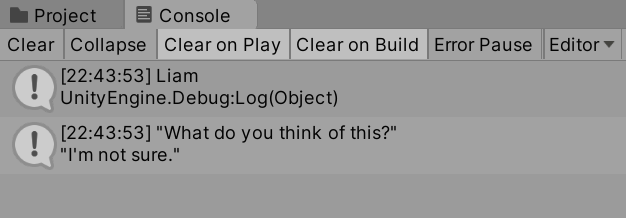
Following code examples from earlier in this chapter, the method ContinueMaximally() is used to load all content to the next set of choices or until the end of the story.
However, as the screenshot shows, this presents a problem. When ContinueMaximally() is used, it loads everything. This means that the use of the tag #Dan is overwritten with the story chunk that follows it.
In order to parse tags per line, the method Continue() is needed.
Continue() versus ContinueMaximally() with Tags
While ContinueMaximally() can be very useful when loading large chunks of a Ink story, the method Continue() allows for a more fine-tuned usage. Paired with the Story API property canContinue, and the internally loops of parsing tags and choices, each part of a line can be processed individually.
New Ink.ink:
"What do you think of this?" #Dan

"I'm not sure." #Liam
NewBehaviourScript.cs:
using System.Collections;
using System.Collections.Generic;
using UnityEngine;
// Add the Ink Runtime
using Ink.Runtime;

public class NewBehaviourScript : MonoBehaviour
{
    // Add a TextAsset representing the compiled Ink Asset
    public TextAsset InkJSONAsset;

    // Start is called before the first frame update
    void Start()
    {
        // Create a new Story object using the compiled (JSON) Ink story text
        Story exampleStory = new Story(InkJSONAsset.text);

        // Each loop, check if there is more story to load
        while (exampleStory.canContinue)
        {
            // Load the next story chunk and return the current text
            string currentTextChunk = exampleStory.Continue();

            // Get any tags loaded in the current story chunk
            List<string> currentTags = exampleStory.currentTags;

            // Create a blank line of dialogue
            string line = "";

            // For each tag in currentTag, set its values to the new variable 'tag'
            foreach (string tag in currentTags)
            {
                // Concatenate the tag and a colon
                line += tag + ": ";
            }

            // Concatenate the current text chunk
            // (This will either have a tag before it or be by itself.)
            line += currentTextChunk;

            // Print the current line using the combined string
            //  created from the current tag and story chunk.
            Debug.Log(line);
        }
    }
}
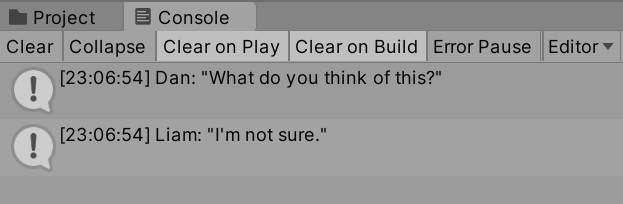
Now, in the above code, a “line” of dialogue is created using string line that is then used as part of parsing the tags of the current story chunk. If there is a tag, it is concatenated to the current line. Next, the current text chunk is also concatenated.
Based on the tag usage in the example story, this creates the output of the following:
Dan: "What do you think of this?"

Liam: "I'm not sure."
Dialogue Tags
There are many different ways to use tags in Ink. Their purpose is not clearly defined in part to give developers and writers the option to use them as they would like. However, one common way to use tags is as dialogue tags. That is, dialogue is written in the story and then the speaker of any particular line is named in the tag of that line. This allows, as later chapters will demonstrate, to use the value of the “speaker” to react in different ways programmatically.
For example, a line of dialogue might look like the following:
"I want a dialogue system!" #Dan
In the above example, the tag #Dan is used to signal that Dan (whomever that might be in the story) is speaking that line. In order to parse it, the code from the previous section can be re-used.
NewBehaviourScript.cs:
using System.Collections;
using System.Collections.Generic;
using UnityEngine;
// Add the Ink Runtime
using Ink.Runtime;

public class NewBehaviourScript : MonoBehaviour
{
    // Add a TextAsset representing the compiled Ink Asset
    [SerializeField] private TextAsset inkJSONAsset;

    // Start is called before the first frame update
    void Start()
    {
        // Create a new Story object using the compiled (JSON) Ink story text
        Story exampleStory = new Story(inkJSONAsset.text);

        // Each loop, check if there is more story to load
        while (exampleStory.canContinue)
        {
            // Load the next story chunk and return the current text
            string currentTextChunk = exampleStory.Continue();

            // Get any tags loaded in the current story chunk
            List<string> currentTags = exampleStory.currentTags;

            // Create a blank line of dialogue
            string line = "";

            // For each tag in currentTag, set its values to the new variable 'tag'
            foreach (string tag in currentTags)
            {
                // Concatenate the tag and a colon
                line += tag + ": ";
            }

            // Concatenate the current text chunk
            // (This will either have a tag before it or be by itself.)
            line += currentTextChunk;

            // Print the current line using the combined string
            //  created from the current tag and story chunk.
            Debug.Log(line);
        }
    }
}
A more advanced Ink example, using the same C# code, might look like the following:
The genie waited as the person in front of them considered their wording.

"I want a dialogue system!" #Dan

The genie nodded and then snapped their fingers.
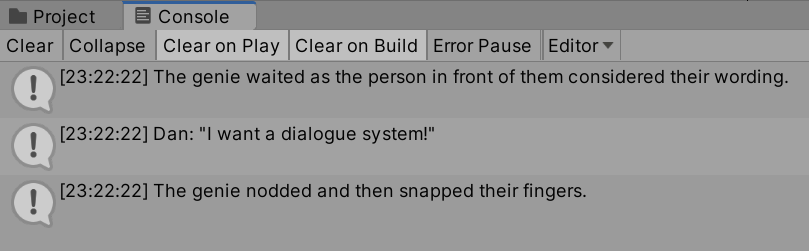
When run, the advanced Ink example would produce the following three lines:
The genie waited as the person in front of them considered their wording.

Dan: "I want a dialogue system!"

The genie nodded and then snapped their fingers.
The tag #Dan would be changed into the string value “Dan: “ and added to the existing line before the current text chunk. Additionally, if no tags are used, the text would be added to line.